Managing work schedules, shift changes, and time-off requests can be challenging, especially for employees who work variable or hourly schedules. To simplify workforce management, many employers use the Legion Workforce Engagement platform.
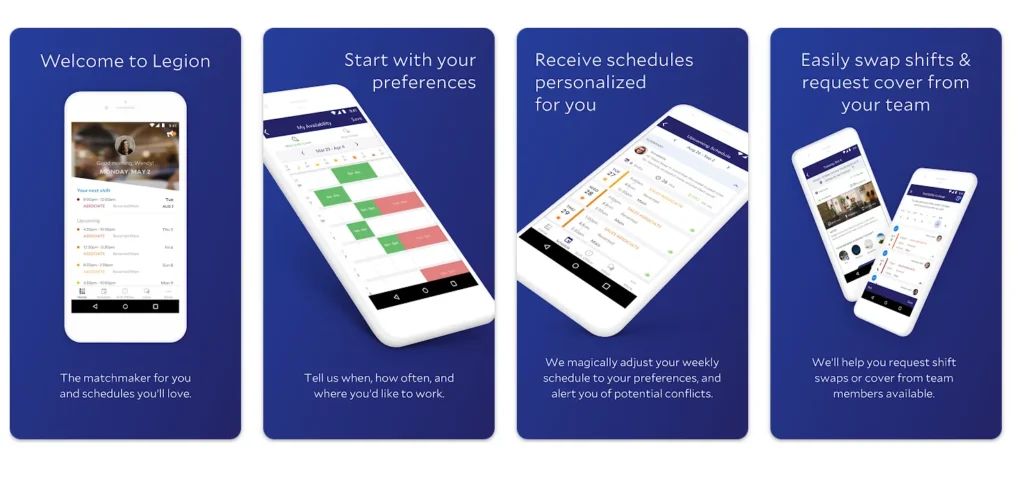
The Legion Workforce Engagement app allows employees to access schedules, manage availability, request time off, receive notifications, and stay connected with their workplace through a mobile device or computer.
This guide explains what the Legion app is, how it works, how to download it, how to log in, and the most common features employees use every day.
What Is the Legion Workforce Engagement App?
Legion Workforce Engagement is a workforce management platform designed to help employers and employees manage scheduling and workforce-related tasks more efficiently.
The platform is developed by Legion Technologies and is used by organizations across industries such as:
- Retail
- Hospitality
- Restaurants
- Healthcare
- Grocery stores
- Service businesses
The app provides a centralized location where employees can view work schedules, submit requests, update availability, and receive workplace notifications.
Instead of relying on printed schedules or phone calls, employees can access important work information directly from their smartphone or web browser.
What Is the Legion App Used For?
The primary purpose of the Legion app is workforce scheduling and employee engagement.
Employees typically use the app to:
- View upcoming schedules
- Check shift assignments
- Request time off
- Update availability
- Pick up available shifts
- Swap shifts with coworkers
- Receive schedule updates
- Access workplace announcements
- Stay informed about company communications
The exact features available may vary depending on how an employer has configured the platform.
Is There a Legion Mobile App?
Yes. Legion Workforce Engagement is available as a mobile application for both Android and iPhone users.
The mobile app allows employees to access their workforce information from virtually anywhere with an internet connection.
This flexibility makes it easier for employees to manage schedules and workplace communications without needing access to a company computer.
Legion App Download for Android
Android users can install Legion Workforce Engagement through the Google Play Store.
Steps to Download
- Open Google Play Store.
- Search for “Legion Workforce Engagement.”
- Select the official application.
- Tap Install.
- Wait for installation to complete.
- Open the app.
- Sign in using employer-provided credentials.
After installation, employees can immediately access available workforce management tools.
Legion App Download for iPhone
iPhone users can install the application from Apple’s App Store.
Steps to Download
- Open the App Store.
- Search for “Legion Workforce Engagement.”
- Select the official app.
- Tap Get.
- Complete installation.
- Launch the application.
- Log in using your company credentials.
The iOS version provides similar functionality to the Android version.
Legion App Login Guide
Employees need valid login credentials provided by their employer before accessing the platform.
Login Steps
- Open the Legion Workforce Engagement app.
- Enter your username or email.
- Enter your password.
- Complete any security verification steps.
- Tap Sign In.
Once authenticated, employees can access scheduling and workforce management features.
Legion Login Requirements
Before attempting to log in, employees typically need:
- Active employee account
- Username or company email
- Password
- Internet connection
- Employer participation in the Legion platform
If you do not have login credentials, contact your manager or human resources department.
Legion App for PC
Many employees ask whether Legion works on computers.
The answer is yes.
Most organizations provide web-based access through a company-specific Legion portal.
Using a computer allows employees to:
- View schedules
- Manage availability
- Request time off
- Review announcements
- Access workforce information
The login URL may vary depending on the employer.
Viewing Your Work Schedule
One of the most frequently used features in Legion is schedule management.
Employees can quickly see:
- Upcoming shifts
- Weekly schedules
- Future assignments
- Schedule updates
- Shift changes
This helps employees stay organized and avoid missing work commitments.
Requesting Time Off Through Legion
Many employers allow time-off requests directly within the app.
Typical Process
- Open Time Off section.
- Select requested dates.
- Enter any required details.
- Submit request.
- Wait for manager review.
Employees can often monitor the approval status directly within the app.
Updating Availability
Availability settings help managers build schedules that better fit employee preferences.
Employees may be able to specify:
- Available days
- Available hours
- Preferred shifts
- Temporary restrictions
- Recurring availability patterns
Keeping availability updated can reduce scheduling conflicts.
Shift Swaps and Shift Trades
Many organizations enable shift-swapping features within Legion.
Employees may be able to:
- Offer shifts to coworkers
- Request shift trades
- Accept available shifts
- Pick up extra hours
Manager approval may be required before schedule changes become official.
Open Shift Opportunities
Some employers post unfilled shifts that employees can claim.
Benefits include:
- Additional working hours
- Increased flexibility
- Easier schedule management
- Faster staffing coverage
Employees interested in extra work can monitor available shifts through the app.
Notifications and Alerts
Legion sends notifications regarding important workplace updates.
Examples include:
- Schedule changes
- New shift opportunities
- Time-off decisions
- Manager communications
- Company announcements
These alerts help employees stay informed and reduce missed information.
Benefits of the Legion App for Employees
The Legion Workforce Engagement platform offers several advantages.
Easy Schedule Access
Employees can access schedules anytime without visiting the workplace.
Improved Communication
Managers can quickly share important information with staff.
Better Work-Life Balance
Employees gain greater visibility into future schedules.
Mobile Convenience
Most workforce management tasks can be completed through a smartphone.
Faster Updates
Schedule changes can be communicated immediately.
Benefits of Legion for Employers
Employers also benefit from workforce management technology.
Common advantages include:
- Simplified scheduling
- Labor optimization
- Improved workforce visibility
- Reduced administrative workload
- Better employee engagement
- More efficient staffing decisions
These capabilities help organizations manage labor resources more effectively.
Common Legion Login Problems and Solutions
Forgot Password
If you forget your password
- Select Forgot Password.
- Follow reset instructions.
- Create a new password.
- Log in again.
If the option is unavailable, contact your employer.
Incorrect Username
Verify:
- Email address spelling
- Employee username
- Company login information
Small typing mistakes can prevent access.
App Not Working
Try the following:
- Check internet connection.
- Update the application.
- Restart your device.
- Reinstall the app.
- Contact company support.
Account Locked
Multiple failed login attempts may temporarily lock an account.
In such cases, employees should contact their manager, HR department, or IT support team.
Is the Legion App Free?
Yes. The Legion Workforce Engagement mobile application is generally free to download from official app stores.
However, access requires an employer account because the platform is designed for workforce management rather than public use.
Security and Privacy
Legion uses secure authentication processes to help protect workforce data.
Employees should:
- Keep passwords confidential.
- Avoid sharing login information.
- Log out of shared devices.
- Use secure internet connections.
- Follow company security policies.
Protecting account credentials helps maintain workplace security.
Legion Workforce Engagement vs Lenovo Legion
Many people confuse these two products because they share the word “Legion.”
Legion Workforce Engagement
- Workforce management software
- Employee scheduling platform
- Mobile workforce application
- Used by employers and employees
Lenovo Legion
- Gaming laptops
- Gaming desktops
- Gaming accessories
- Performance management software
They are completely separate products with different purposes.
Frequently Asked Questions
What is Legion Workforce Engagement?
Legion Workforce Engagement is a workforce management platform used for employee scheduling, availability management, and workplace communication.
Can I download the Legion app for Android?
Yes. Android users can install Legion Workforce Engagement from the Google Play Store.
Is the Legion app available for iPhone?
Yes. The app is available through Apple’s App Store.
Can I use Legion on my computer?
Many employers provide browser-based access through a Legion web portal.
How do I get a Legion login?
Your employer, manager, supervisor, or HR department typically provides login credentials.
Can I request time off through Legion?
Many organizations enable time-off requests directly within the app.
Does Legion allow shift swaps?
Some employers allow employees to swap shifts through the platform, often with manager approval.
Is the Legion app free?
The application is free to download, but access requires an employer account.
What should I do if Legion won’t let me log in?
Check your credentials, reset your password if necessary, and contact your employer if the issue continues.
Is Legion available 24/7?
Employees can generally access the platform at any time, provided the employer’s system is operational and internet access is available.
Conclusion
The Legion Workforce Engagement app is a modern workforce management solution that helps employees stay connected with their schedules, availability, shift opportunities, and workplace communications. Whether using Android, iPhone, or a web browser on a PC, employees can access essential workforce information from virtually anywhere.
By simplifying scheduling, improving communication, and providing mobile access to workforce tools, Legion helps both employees and employers manage work more efficiently.